
TAB 4:
Building Connections
From Qualification to Structured Placement
The next phase introduces how qualified members begin forming structured relationships.
Unlike traditional referral programs where connections end at registration, this platform utilizes a chronological placement process to transform members into an expanding community.
Once an Open Account Member activates their platform access, they complete a precise, two-step progression:
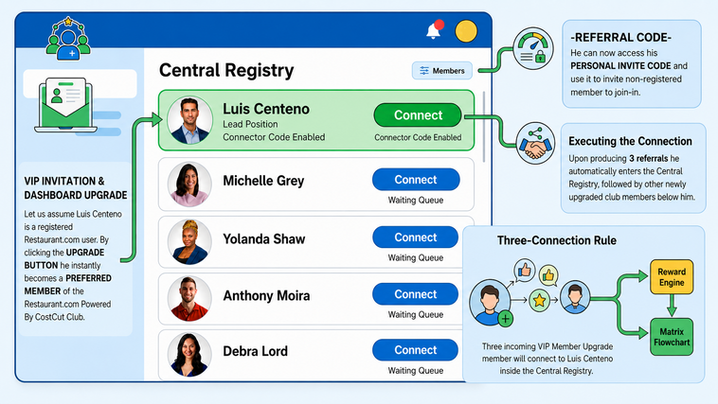
Step 1: The VIP Invitation & Dashboard Upgrade
Once a member achieves Open Account status, a prominent notification appears on their dashboard inviting them to upgrade.
Participation is completely voluntary, and the upgrade is provided entirely free of charge. Members may upgrade immediately, return later, or continue using the baseline platform without upgrading.
When a member chooses to advance, they click the "Upgrade to VIP" button.
This action activates their account profile within the operational architecture and ushers them into the live Central Registry interface for the very first time.
Step 2: Executing the Connection
Upon entering the live Central Registry page, the newly upgraded VIP Member completes their placement by clicking the active Green Connect button.
To ensure systematic execution, the user interface enforces a strict operational protocol:
-
Targeted Selection: The green button is the only clickable or interactive element on the page; all blue buttons remain locked and inactive.
-
Automated Coding: Clicking the green button triggers the embedded Connector Code, securely binding the member to the current Lead Position.
-
Queue Progression: This single action successfully records the connection, advances the Lead Position toward its three-connection requirement, and solidifies the new VIP Member’s permanent chronological standing in the waiting queue.
🟢 The Central Registry Landscape
The Central Registry now transitions from a passive chronological record into an active relationship-building platform.
The system is engineered around one clear operational principle: only one member at a time is eligible to receive new structural connections.
Every connection follows a strict, first-qualified, first-connected sequence.
This chronological discipline preserves total fairness, eliminates manual placement, and ensures no member can bypass another.
To make this process intuitive, the registry dashboard displays two distinct connection states:
-
🟢 The Lead Position (Green Connect Button): The member currently at the front of the chronological queue displays the only active green Connect button. This is the single profile eligible to receive the next structural connection from an incoming VIP Member.
-
🔵 The Waiting Queue (Blue Connect Button): Every remaining member displays a blue Connect button, indicating that their turn to receive connections will automatically arrive as the chronological queue naturally advances. No member may bypass another member's position.

🔑 The Connector Code & Operational Flow
Two independent system codes manage the platform lifecycle, each performing a completely distinct function within the ecosystem:
-
The Invite Code: Used exclusively during onboarding to introduce new consumers into the Restaurant.com Powered By CostCut Club application during the Preferred Member phase. Once onboarding is complete, its purpose is fulfilled.
-
The Connector Code: A secure internal code embedded within the active green Connect button. Rather than bringing in new users, it links qualified Open Account Members together during VIP activation to build the platform's relationship architecture.
In short: One code grows the community; the other organizes it.

🤖 A Fully Automated Process
Whenever an Open Account Member chooses to activate VIP Membership, the system automatically directs the member to the only active green Connect button.
There are no manual selections, skipped positions, or administrator interventions.
Each successful connection advances the architecture while preserving strict chronological integrity.
The sequence operates via an automated, repeating loop:
-
Three-Connection Cap: A Lead Position remains active until receiving exactly three successful connections from incoming VIP upgrades.
-
Automated Completion: For example, once three Open Account Members click Michelle Grey’s green Connect button, her position is completed and she exits the front of the Central Registry.

Queue Advancement: Every remaining member advances up one position in the line.
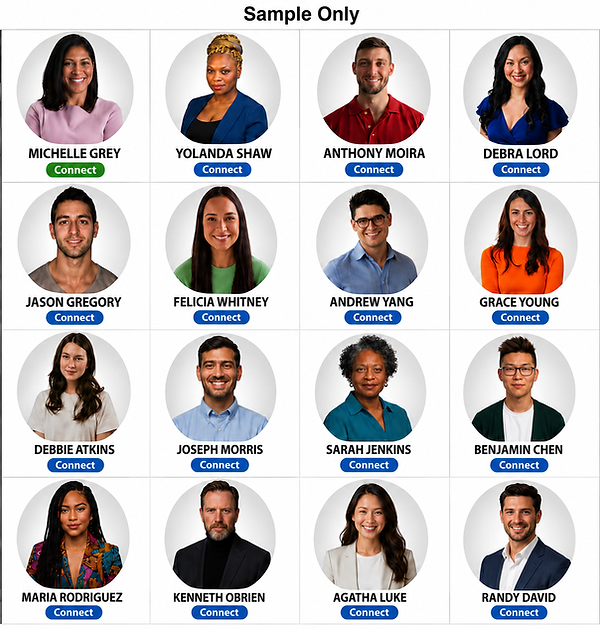
Button Transition: Yolanda Shaw then occupies the new Lead Position.
Her button instantly transitions from blue to green, rendering her profile the sole active target for the next three incoming members on the same strict, first-come, first-served basis.

Although members experience a simple and intuitive connection process, every successful connection quietly contributes to something much larger.
Behind the scenes, the Central Registry continuously builds the structural foundation of the expanding Restaurant.com Powered By CostCut Club ecosystem, strengthening the network while preparing the platform for the next phase.